

Table of Contents
Two releases in two weeks for the WordPress AI content rewriter plugin. That’s how May has gone for WPeMatico GPT Spinner — and there’s a good reason both landed so close together.
Version 3.4 tackled a wave of critical issues that had been affecting campaigns in ways users could feel but not always explain: credits being silently wasted, the manual rewrite button returning a license error on every click, images not quite right. Then version 3.5 arrived with structural improvements: a cleaner settings page, a new image source to replace the one Google quietly killed, and performance gains that make every campaign run faster.
If you’ve been running GPT Spinner and something felt off, there’s a good chance this update explains why — and fixes it. Here’s everything that changed, and why it matters for your campaigns.
What Is WPeMatico GPT Spinner?
WPeMatico GPT Spinner is a WordPress AI content rewriter plugin addon for WPeMatico, the free autoblogging plugin. Every time one of your campaigns imports a post from an RSS feed, GPT Spinner intercepts it, rewrites the text using the AI engine of your choice, and attaches a relevant image as the featured image — all automatically, before the post is published.
It connects to multiple rewriting services (including our own AI Etruel Rewriter API, RapidAPI Rewriter, and APILayer Paraphraser) and multiple image sources (SerpApi, Flickr, Pixabay, and Google Image API). You configure it once per campaign; it handles every imported item from then on, without any manual intervention.
Already using GPT Spinner? Jump to What’s New in 3.5 or What’s New in 3.4.
What’s New in Version 3.5
A Settings Page That Finally Makes Sense
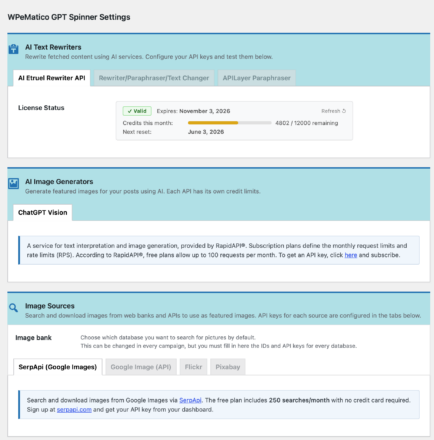
The settings page has been reorganized into three clearly labeled sections — AI Text Rewriters, AI Image Generators, and Image Sources — each with its own tab group. Finding, testing, and configuring any service is now much faster and more intuitive. No more scrolling through everything to find the one setting you need to change.
SerpApi: A Reliable Replacement for Google Image Scraping
Google Image Scraping has been removed in 3.5. Google’s platform changes made it technically impossible to continue, and if you had campaigns using it, they’ve likely been running without images for a while — silently, without any error showing up.
SerpApi is its direct replacement, and it’s now built right into GPT Spinner. It delivers real Google image search results through an official API — with the same filters you’re used to: language, country, size, orientation, type, license, color, and safe search. Best of all, it offers 250 free image searches per month with no credit card required.
If you had Google Scraping enabled in any campaign, switch it to SerpApi in that campaign’s GPT Spinner metabox. Add your free SerpApi key at WPeMatico → GPT Spinner → Settings → Image Sources → SerpApi.
Faster Campaigns
Two performance improvements in 3.5 that add up quickly, especially on larger campaigns:
- Settings are now loaded once per campaign run instead of on every single post. On a campaign processing 50+ posts, the difference is noticeable.
- Every connection to an image source now has a strict time limit. A Flickr API taking 30 seconds to respond no longer blocks your entire campaign run — slow requests get dropped and processing continues with the next post.
Update and Forget — No Reconfiguration Needed
All your existing campaign settings — including configurations saved under older key names from previous plugin versions — are automatically recognized and translated to the new format on the fly. Update GPT Spinner and your campaigns keep running exactly as before, without touching a single setting.
Critical Fix: Google Image API Was Never Actually Fetching Images
This is the most important fix in 3.5. Since the Google Image API source was introduced in version 2.0, it has been returning general web page results instead of actual images. A required parameter was missing from every single request, which meant every filter you had configured — image type, size, orientation, color, license — was being silently ignored every time.
Version 3.5 corrects this completely. Google Image API now fetches real images with all your filters applied. Image URLs are also now read from the correct location in Google’s response, so you always get a direct link to the image rather than to a web page.
Additionally: the Test Key button for Google Image API was reporting a failure even when your API key and Search Engine ID were perfectly valid. That’s fixed too — the test now accurately reflects whether your credentials work.
Flickr: Faster and More Reliable
Every post using Flickr as an image source was making up to 3 unnecessary extra API calls just to retrieve the image URL. In 3.5, those URLs come directly from the initial search response — the follow-up call is only made when strictly necessary. Less API usage, faster image attachment per post.
Also fixed: a rare crash that could occur when Flickr failed to respond during image retrieval. The plugin now handles Flickr timeouts gracefully and continues to the next post without interrupting the campaign run.
Pixabay: Better Images, Correct Filters
- Image type filter labels in the settings were showing wrong options (“Screenshot” instead of “Illustration”, “Other” instead of “Vector”). They now match the actual Pixabay API options.
- Pixabay was incorrectly requiring a username to be filled in — when only an API key is actually needed. The username field has been removed to avoid confusion. Any value you had saved is preserved.
- Images are now delivered at 1280px resolution instead of 640px, from the same API call, at no extra cost. Better image quality on every post using Pixabay.
Your AI Credits Are Protected
If a content rewrite fails for any reason, the title rewrite is now skipped entirely. Previously, a title rewrite credit could be consumed even when the content hadn’t been successfully rewritten — meaning you were paying for half a job. Credits now only count when a complete rewrite succeeds.
⚠️ Important: Google Image API Is Being Discontinued
Google has announced that the Custom Search JSON API — used by the “Google Image API” image source — is closed to new customers and will be fully discontinued on January 1, 2027. If you currently use it, your existing API key will continue to work until that date. A notice with a link to Google’s official announcement is now shown in your plugin settings. We recommend planning your migration to SerpApi before the 2027 deadline.
What’s New in Version 3.4
License Status Panel: Know Exactly Where You Stand
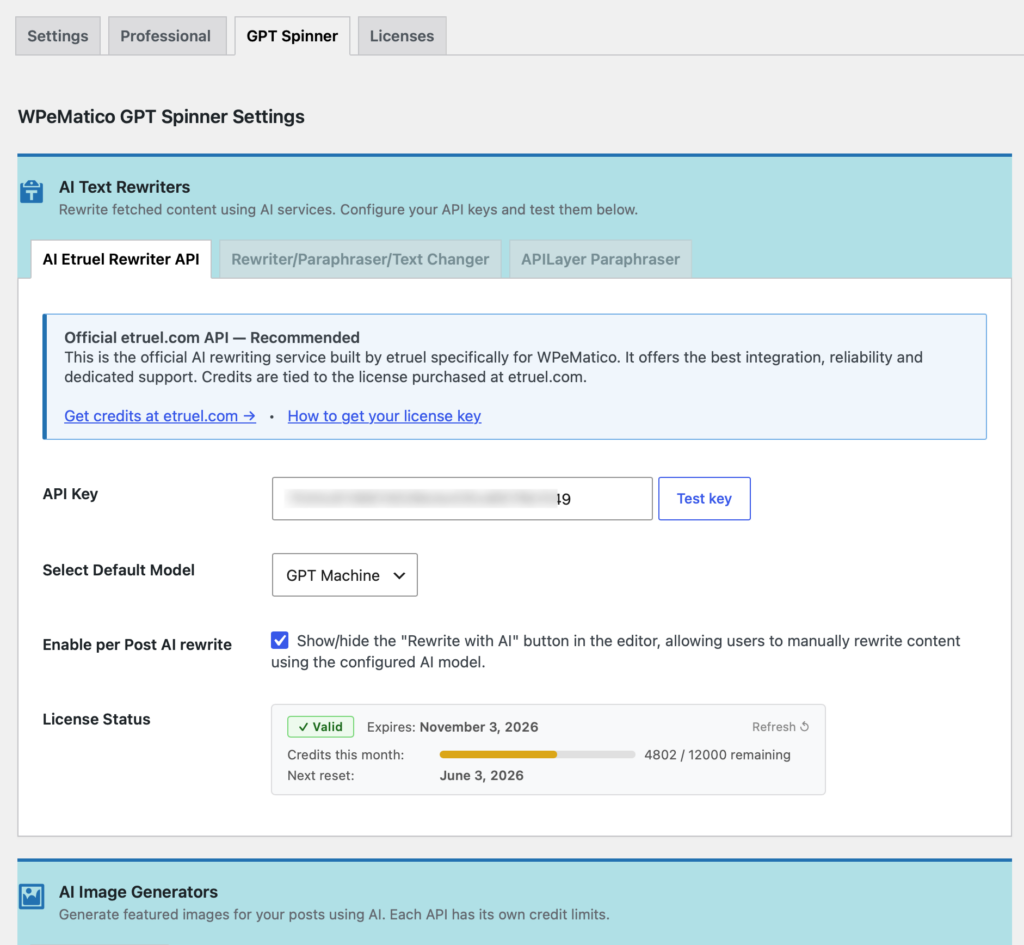
If you use the AI Etruel Rewriter API, you now have a live License Status panel directly in your GPT Spinner settings page — no need to log into etruel.com to check your balance:
- ✅ License validity at a glance
- 📅 Expiration date and next credit reset date (formatted to match your WordPress date settings)
- 📊 Credits used vs. credits remaining, with a visual progress bar
- 🔄 Loads automatically when you open settings, and refreshes automatically after each Test Key click
Fallbacks Now Trigger When APIs Are Slow Too
The fallback system — where GPT Spinner automatically switches to your configured alternative API when the primary one fails — was previously only triggered by explicit error responses. If the primary API was simply slow or temporarily unreachable, the plugin was silently skipping the rewrite with no fallback and no notice. Your post went out unprocessed without any warning.
In 3.4, a slow or unresponsive primary API correctly triggers the fallback, the same as any other failure. Campaigns keep producing rewritten content even when your primary service has a bad moment.
AI-Generated Images Now Save with the Correct File Type
Images generated via ChatGPT Vision are now saved with their actual file type and extension. Previously they were always stored as .jpg regardless of the format the image actually arrived in.
No More Image Bleed Between Posts
In rare cases, the featured image processed for one post could carry over and be incorrectly attached to the next post in the same campaign run. Each post now always processes its own image independently, with nothing leaking from the previous one.
Image Filters for Google Image API Now Actually Apply
The search filters you configured for Google Image API — country, color, size, image type, safe search — were being silently ignored in every request. They are now correctly sent with each search.
Other Content Processing Fixes
- Fixed a rare crash when an image source returned no results during the thumbnail sourcing step. The plugin now handles this gracefully and moves on to the next post.
- The custom prompt field in campaign settings was showing pre-filled example text even when you hadn’t saved a prompt of your own. The field is now blank until you actually save something.
- A harmless but noisy warning that could appear in server error logs when using RapidAPI Rewriter on certain plan tiers has been cleaned up.
Per-Post Manual Rewrite: Now Actually Works
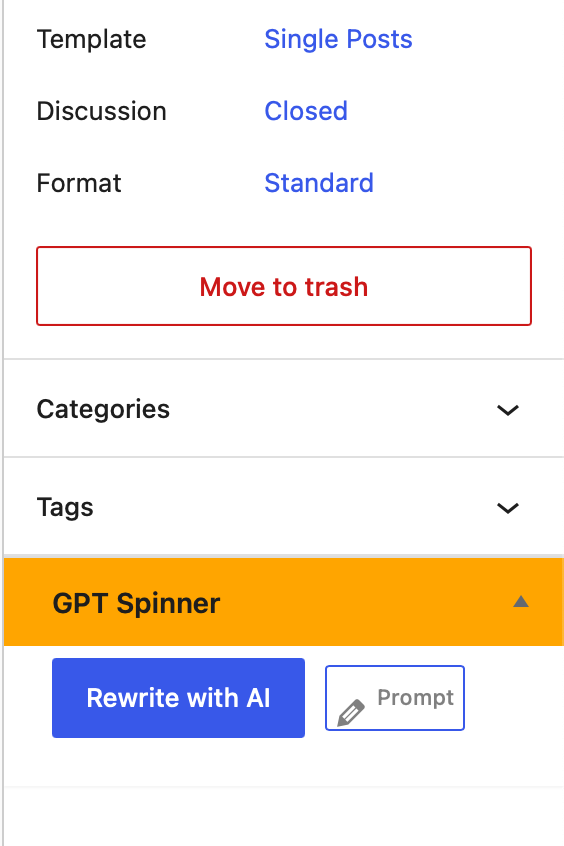
The “Rewrite with AI” button in the post editor sidebar was returning “We couldn’t validate your license” on every single click — even with a valid, active license key saved in settings. This is now fixed; manual rewrites work correctly.
The Prompt editor was also opening squeezed inside the sidebar panel instead of as a proper full-screen overlay. It now opens correctly as a centered modal on top of the page, as intended.
Admin Interface Fixes
- Clicking a tab label in the settings page sometimes didn’t switch to the correct tab. Tab navigation now works reliably across all browsers.
- The License Status panel could show a blank area instead of a helpful message when no data was returned from the API. It now always displays a clear status message.
- The credit usage bar appeared almost full even when only a few credits had been used. The bar now fills correctly as credits are consumed — empty when you have full credit, full when all credits are spent.
- Some field labels in the campaign settings panel were appearing displaced from their fields. Labels are now correctly positioned.
- The confirmation message after a manual rewrite now correctly tells you whether the title was also rewritten or kept as the original.
Full PHP 8.x Compatibility
All remaining issues that could cause errors or crashes on servers running PHP 8.0 or higher have been resolved. GPT Spinner 3.4 is fully compatible with PHP 8.x. If you’ve been holding off on upgrading your server’s PHP version, you’re clear to go.
Get WPeMatico GPT Spinner
Buy the Plugin Standalone
Pick up WPeMatico GPT Spinner as a standalone product with one year of updates and support included.
Or Get It in a Membership — Better Value
GPT Spinner is included in three annual memberships that bundle multiple WPeMatico addons at a significant discount. All available in 1 site / 2–5 sites / 100 sites / Unlimited & Lifetime tiers:
| Membership | What’s included with GPT Spinner | From (1 site) |
|---|---|---|
| ESSENTIALS | GPT Spinner + Professional + Full Content | |
| PLUS | GPT Spinner + Professional + Full Content + Make me Feed Good + Better Excerpts + cats2tags | $149/year |
| PREMIUM | GPT Spinner + 9 more addons (Polyglot, Synchronizer, Manual Fetching…) | |
| PERFECT | All Addons + every new addon launched during the year | $311/year |
🔑 Note on the AI Etruel Rewriter API: The AI rewriting engine is a separate cloud service sold independently from the plugin. Credit plans start at just $1/month. You can also connect your own RapidAPI key or other third-party services instead — the plugin license and the API credits are entirely independent of each other.
Already a customer? Go to WordPress Dashboard → Plugins → Updates and update normally. All your campaign configurations migrate automatically — no reconfiguration needed.
Frequently Asked Questions
What is WPeMatico GPT Spinner?
Do I need WPeMatico to use GPT Spinner?
I was using Google Image Scraping — what do I do now?
I use the Google Image API — is it still supported?
Do I need to reconfigure my campaigns after updating?
What happens when my API reaches its monthly limit?
Which membership is right for me?
- Start with ESSENTIALS ($82/year) if you want GPT Spinner paired with the core Professional and Full Content addons.
- Step up to PLUS ($149/year) if you also need to create feeds from sites that don’t have one, generate better excerpts, and auto-tag posts.
- Go with PREMIUM ($199/year) if you need automatic translation, post synchronization, or manual approval workflows on top of all that.
- And PERFECT ($311/year) is the everything plan — all 17 addons plus every new one we release during the year, at no extra cost.
Is this compatible with PHP 8?
Ready to Run a WordPress AI Content Rewriter That Actually Delivers?
WPeMatico GPT Spinner 3.4 and 3.5 fixed the issues that were quietly costing you credits, silently skipping images, and hanging your campaigns — and added the tools to monitor and manage your AI pipeline with confidence. If you’ve been running GPT Spinner and holding off on updating, now is the time. If you’re evaluating it for the first time, this is the most solid version yet.
👉 Get WPeMatico GPT Spinner →
👉 Browse all WPeMatico memberships →
👉 Get your AI Etruel Rewriter API license →